Introduction
This article will show the Eclipse technologies stack consisting of
Eclipse E4,
EMF and
XWT in action. First, we will have a look at the functionality the application has to provide, then see how this can be done using those Eclipse frameworks.
The application should be as in the following screenshot:
Requirements: User must be able to...
- ... create a new layered geographic map or load a list of existing ones
- ... create new layers (Markers/Points-of-interests, Google, OpenStreetMap, OGC WMS, GML, KML, ...)
- ... re-order the layers of a selected map
- ... edit layers, add new Points-of-interests (POIs) to a Markers layer and/or geocode them
- ... show a preview of the map
All business cases can already be handled by the
Geoff project. The interesting part is what frameworks we want to use to implement the requirements. Obviously, as the title says, we have chosen Eclipse E4 as the platform, EMF for modeling the business domain and XWT for declaratively defining the UI via XML.
Modeling our business domain
We are not going to describe the full domain model, but present a simplified one which looks like the following:
There is a base object GeoMap which has a list of Layers which can be any of Markers, OSM, Google, etc.
The full ecore meta model is available in the
Geoff git repository. To simplify the UI development, we will use the generated edit code of the model as well.
Defining the E4 application model
There is a left pane with some parts providing the editing capabilities and there is a right pane which hosts a preview of the configured map:
Providing the contents of the parts in XWT
The entry point of the application is the map selection/creation part:
This UI consists of a TreeViewer with the maps configured so far and a Toolbar (style=VERTICAL) with the actions.
A name is given to the TreeViewer via name="mapsViewer". This allows other objects to reference it. The input is configured using XWT's powerful binding expression: {Binding path=input}. This tells XWT to bind the 'input' property of the data object (provided to the root of the UI) to the 'input' property of the JFace TreeViewer. As we are using the generated EMF Edit code of our business model, we want to use an AdapterFactoryContentProvider as a content provider for out TreeViewer. This is done using the Make object which will use E4's DI engine to create and inject a new instance of the provided class. Remember that the regular AdapterFactoryContentProvider of EMF Edit does not allow DI, so, we have to redefine the class as folows:
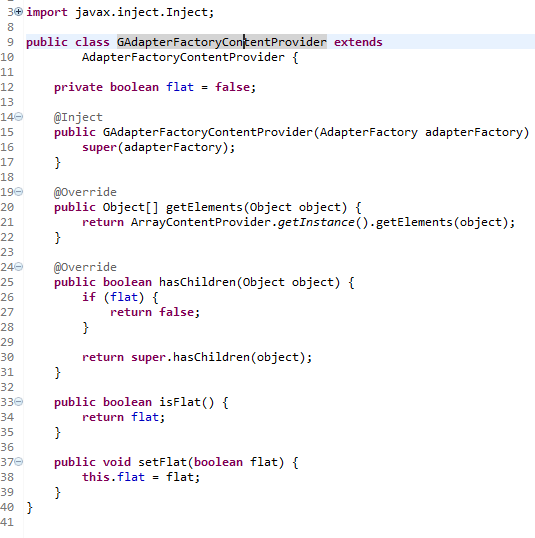
As you can see, we are using the @Inject annotation to get missing input, in this case, the DI will provide an AdapterFactory instance to the constructor. Furthermore, we make the content provider be able to hide all children in our root object (GeoMap), that is, we can make the content provider to only return a flat list of the elements. Background: JFace's ListViewer does not allow to show an object's image out of the box.
The label provider of our TreeViewer is configured in the same way.
Next comes a highlight of the XWT E4 integration efforts...
How would you listen for the TreeViewer's selection and put it to your IEclipseContext?
The E4 way would be:
So, lots of boilerplate code! In XWT this can be reduced to just an 'Export' instruction:
This tells XWT to listen to the viewer's singleSelection property and export it into the current IEclipseContext. Remember that Eclipse Contexts are hierarchical: if you are in a Perspective, then each part inside that Perspective has its own context. So, we have to walk one level up from the current context. In the Java code we have called context.getParent(). In the XWT Export instruction we do this by providing the level argument. In this case level="1" just means one level up, so, the export will be done in the Perspective's context and the object is available to all other parts in that Perspective.
Next, the ToolBar on the right side of the TreeViewer:
The UI definition should be self-explanatory, but there is one simplification here. We use XWT's selectionEvent attribute on each ToolItem to define the handling code. For instance, selectionEvent="newMap" tells XWT to look for a method in the handler class that is called 'newMap' and execute it once the ToolItem is pressed. The handling method looks like this:
The first thing to note is that the key point to using the E4 integration of XWT is to subclass your part's POJO from E4XWTUI.
Next, we annotate all fields we are interested in to be injected and define the event handler method newMap() which will be called once the ToolItem is pressed.
The next big step is to make different XWT UIs communicate with each other. In the prior step we listen to the TreeViewer's single selection property and export it into the current Perspective's IEclipseContext to make it available to other parts.
One other part is the Map Details Part:
Once the selection of the maps viewer changes, it will be exported for use with other UI parts.
The Map Details Part's UI looks like this:
To listen to IEclipseContext variables/objects that are set/reset, we have to use the Var instruction:
x:name="map" tells XWT to name this object "map", so other objects can reference it inside the same UI definition. varName="geoMap" tells it to listen for a variable called "geoMap" inside the active IEclipseContext chain.
Next, we can define all other UI controls, for example:
The interesting part is again the powerful expression: text="{Binding elementName=map, path=value.(g:GeoMap.name)}
This means to bind the GeoMap object's name property which can be obtained from the previous Var instruction to the text property of the SWT Text control.
The remaining UI is done following these principles.
Summary
The most important part of this article was to show XWT's E4 integration to create very complex and custom SWT UIs. This was achieved by providing the building blocks to make parts communicate with each other by publishing variables and listening to them.
The benefits we get when using these technologies stack:
- E4's powerful DI engine and application model
- EMF for rapid business domain modelling and code generation
- strict separation of UI and business logic using XWT (no single SWT widget was instantiated in this application in Java code, all done in XML)
- loosely coupled UIs that can communicate with each other via the IEclipseContext hierarchy


